You do not always need a mod to give Minecraft a different look. A Java resource pack can change textures, block models, sounds, or menus while you continue playing through PojavLauncher.
Choose a pack for the game version you use, copy its ZIP into that profile’s resourcepacks folder, and select it inside Minecraft. The downloads below focus on a small grass-model change, so you can try a different look without starting with a large texture pack.
PojavLauncher Resource Pack Download
Fast Better Grass changes block models so grass and related blocks use their top textures on their sides. It uses vanilla models and does not require OptiFine or another mod. The original MIT-licensed ZIPs below are hosted on this site.
| Pack release | Minecraft target | File size | Download |
|---|---|---|---|
| Fast Better Grass 1.20 | 1.20.1 | 10.7 KB | Download ZIP |
| Fast Better Grass 1.21 | 1.21.1 | 10.7 KB | Download ZIP |
Use the 1.20 pack for Minecraft 1.20.1 and the 1.21 pack for Minecraft 1.21.1. Keep the downloaded ZIP file as it is.
How to Add a Resource Pack in PojavLauncher
Start with a working game profile. Our first-launch guide helps you test Minecraft before adding a resource pack.
- Download the ZIP that matches the game version you want to launch.
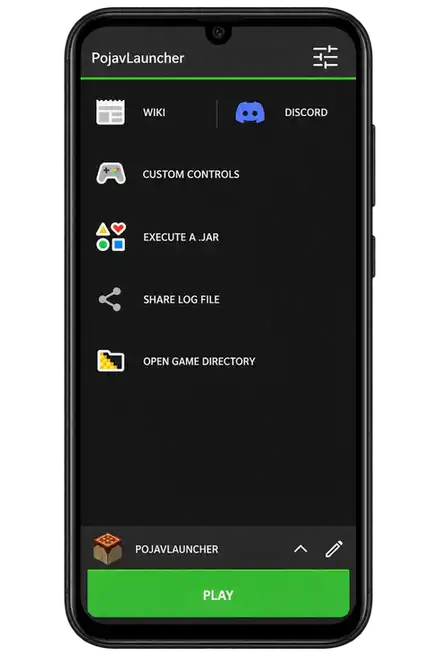
- Open PojavLauncher and choose the profile you actually use. Open its game directory from the launcher menu.
- Find or create the
resourcepacksfolder inside that game directory. - Copy the downloaded ZIP directly into
resourcepacks. Keep this download zipped. - Launch Minecraft and open Options → Resource Packs. Move the pack from the available list into the selected list and confirm.
- For Fast Better Grass, place it at the top of the selected pack order, as its included description requests.
Open the game directory for the profile you play. If you use a custom profile path, put the pack in that profile’s resourcepacks folder.
Check the Resource-Pack ZIP Structure
A Java resource pack needs pack.mcmeta at the archive’s top level. A ZIP containing another folder or ZIP can fail to appear. The hosted files were checked for their top-level metadata and archive integrity.
Active profile game directory/
└── resourcepacks/
    └── fast-better-grass.zip
        ├── pack.mcmeta
        └── assets/
Resource Pack Not Showing or Not Working?
- Not in the available list: verify the active profile’s path and the ZIP structure.
- Marked incompatible: check the game release and pack metadata. A pack’s filename alone is not proof of compatibility.
- Only some models change: test it at the top of the selected order and temporarily disable packs that replace the same models.
- Dark areas are unchanged: Fast Better Grass is a grass-model pack, not a fullbright pack, shader, or night-vision effect.
- Slowdowns with another pack: reduce texture resolution, render distance, and other graphics options. Phone GPU memory is limited.
Resource Packs, Shaders, and Mods
A standard resource-pack ZIP is selected inside Minecraft. A mod JAR needs its compatible loader and belongs in mods. Shader support depends on the renderer and shader-loading setup; it does not come from placing a shader archive in resourcepacks.
For gameplay or performance mods, see PojavLauncher Mods. For iPhone installation and file-access requirements, see PojavLauncher iOS.
Choosing Other Java Resource Packs
Check a creator’s Java Edition version list and any required mods. Bedrock .mcpack add-ons are a different format. A pack that needs OptiFine, custom lightmaps, or extra model features needs that supporting setup too; the no-mod requirement on this page applies specifically to Fast Better Grass.