If you enjoy changing the way Minecraft works, mods give you plenty to try. PojavLauncher can run supported Java Edition mods on your phone, from small interface tools to packs with new gameplay. Start with one Minecraft version so you can choose files that belong together.
The loader matters too. A Fabric mod needs a Fabric profile, while a Forge mod needs Forge. Once that profile runs on its own, you can add matching mods a few at a time and see how your phone handles them.
Some players want better performance, while others want new blocks, tools, or gameplay. Mods can help you change the way Minecraft feels. With PojavLauncher, you can use supported Java Edition mods on your phone after setting up the right game version and loader.
PojavLauncher Mods Download
PojavLauncher Optimized 1.0.0 is a Fabric modpack with performance and utility mods. Pick the file for your Minecraft version, download it here, and follow the installation steps below.
| Minecraft | Loader | Pack contents | File size | Download |
|---|---|---|---|---|
| Minecraft 1.20.1 | Fabric 0.16.10 | 28 entries | 4.8 KB | Download .mrpack |
| Minecraft 1.21.1 | Fabric 0.16.10 | 22 entries | 3.9 KB | Download .mrpack |
The small .mrpack download is a modpack index, not a ZIP containing every mod. A compatible importer downloads the referenced JARs and installs the pack’s loader. Do not put the .mrpack file in your mods folder.
Choose the Minecraft version you play. Keep this download as an MRPACK file and import it as a modpack.
How to Install Mods in PojavLauncher
If this is your first setup, follow the vanilla profile and first-launch steps before installing a mod loader.
For individual .jar mods, start with a clean modded profile. Keep a backup of worlds you want to use before adding or removing mods.
- Pick one Minecraft version. Choose it first, then find mods built for that version. Do not assume a mod for another release will load.
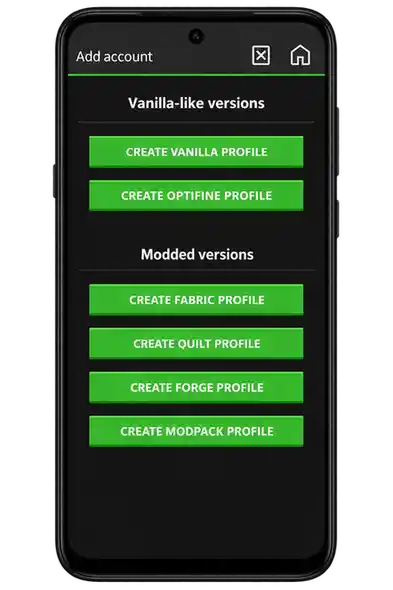
- Create a Forge or Fabric profile. Open the launcher’s version selector and create a new profile. Choose the loader your mods require. Labels vary between builds; older builds may provide an installer-JAR option.
- Launch the empty profile once. Confirm that the loader reaches the Minecraft menu before adding any mods.
- Download the right JARs. Use each creator’s project page. Match Java Edition, Minecraft version, and loader. Fabric API is a dependency for many Fabric mods, but it does not install Fabric Loader.
- Open the active game directory. Use Open Game Directory in the launcher. Find or create a folder named
modsinside that profile’s game directory. - Copy the files and launch that profile. Place the mod JARs and required dependencies directly in
mods. Keep them as JAR files. Add a small group at a time so a conflict is easier to isolate.
Where Is the Mods Folder?
The folder belongs to the game profile you launch. Use the launcher’s directory shortcut instead of relying on a single Android storage path, which may vary by app build and storage permissions. A custom profile path also changes where its mods belong.
Active profile game directory/
└── mods/
    ├── matching-mod.jar
    └── required-dependency.jar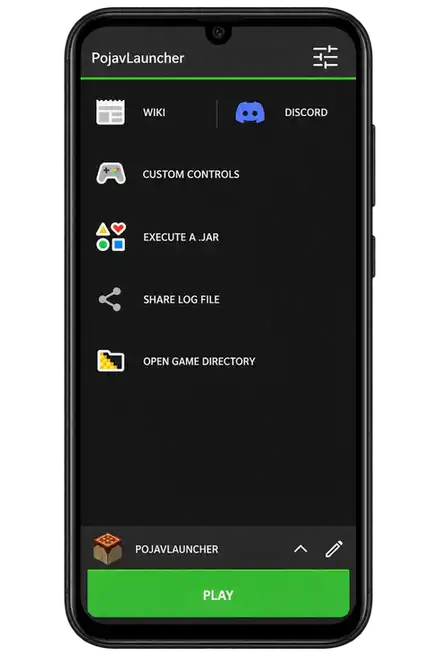
How to Install a PojavLauncher Modpack
- Download the
.mrpackarchive for the game version you want. - Open the profile creator. If your build offers Create Modpack Profile or a local pack import option, choose the downloaded file. Availability varies between launcher builds.
- Let the importer read the manifest, set up Fabric, and download the referenced mods. Keep an internet connection during this step.
- Launch the imported profile by itself. Test performance before copying worlds or adding more mods.
If your build cannot import local MRPACK files, use a compatible MRPACK importer to prepare the instance, or install the listed mods manually into a matching Fabric profile. Copying or renaming an MRPACK to a JAR will not install it.
The hosted packs specify Fabric Loader 0.16.10. Minecraft 1.20.1 and 1.21.1 have separate archives; their mod files are not interchangeable.
Useful Mods to Consider
Begin with the feature you need, then check the creator’s version list. These are options to evaluate, rather than a guarantee of compatibility on every phone.
| Project | What it does | Before installing |
|---|---|---|
| Fabric API | Provides APIs used by many Fabric mods. | Install the version required by your game and mods; this is not Fabric Loader. |
| Mod Menu | Shows installed mods and exposes supported configuration screens. | Choose a build for your Minecraft version and loader. |
| Lithium | Optimizes game logic such as ticking and entity processing. | Use the correct loader variant and read its dependencies. |
| FerriteCore | Reduces memory use in parts of Minecraft. | Available builds differ by version and loader. |
| Sodium / Iris | Rendering optimization and shader-related functionality. | Renderer support matters on PojavLauncher; desktop compatibility is not enough. |
Performance Mods and Renderer Support
Some graphics mods need a compatible renderer. The Gladiolus build includes LTW support for Sodium and Iris, although shader support is limited. Start without shaders and check how the game runs on your phone.
Fix PojavLauncher Mods Not Working
- Wrong profile: select the Forge or Fabric profile you installed, rather than a vanilla profile.
- Wrong game or loader version: check the mod’s file page, not only its name. Forge, Fabric, and NeoForge builds are different.
- Missing dependencies: read the loader’s error message and add only the required compatible libraries.
- Duplicate mods: keep one version of each mod in the folder. Temporarily remove recently added files to isolate a conflict.
- Memory or graphics errors: reduce the pack size and game settings. Leave memory for the operating system, and check renderer requirements for graphics mods.
- Missing mod after import: check its filename. The publisher’s 1.21.1 archive lists Gamma Utils with a trailing
(2)after.jar; if it is copied with that name, rename the installed file to end in.jar.
Use Share Log File from the launcher menu when asking for help. The relevant crash message is more useful than changing several settings at once.
Mods, Resource Packs, and APKs Are Different
Java mod JARs go in mods after installing the right loader. Resource-pack ZIPs go in resourcepacks and are enabled inside Minecraft. A modpack archive goes through an importer. An APK installs an Android app; it is not a Minecraft Java mod.
If you only want to change textures or block models, use a resource pack instead of a mod.
If your profile uses Glow Worm, our Glow Worm renderer and mods guide explains the settings and directory checks to make before adding mods.